Showing posts with label art jam. Show all posts

Monday, August 8, 2011

Sunday, July 31, 2011

Artjam 17: Army of Me

Please listen to Army of Me (Sucker Punch Remix) while looking.
Suckerpunch!

God I loved that movie. I know it doesn't have the greatest story plot in the universe, but the visuals... man! The visuals is all I'm about, and this flick has them -like a boss! So this is my tribute to my favorite character of the movie: (and I think almost everyone else's too) Babydoll.

I really liked how it turned at the end, so I decided to share the process. I condensed one or two steps so I can make it shorter but it is essentially the same as always.

Here it goes:

1. Sketch. I covered the sketching part on my last post but here it is again.


2. Background and flats. After deciding that the fight was going to take place just like the scene in the movie, I painted a cloudy sky, then filled both characters with color for easier selection. After that, I changed the color tones and start building from there.


One thing I think I have never mentioned before is the order of the layers in Photoshop. This is important because, each artist has its own style and order of the layers. This obviously affects painting or coloring process and the final outcome of the piece. After several years and experiments, in this particular style (digital painting) this is my basic placing of the layers:


1. Artline. Mode: Normal. 


2. Color: Mode Normal. I used this layer in Multiply mode, but this distorts how the colors look and causes trouble with any layers placed below. Later on this layer is merged with the artline.

3. Background. Mode Normal. In terms of selecting and erasing, it is easier for me to have the background and the color layers separated.


3. Light Sources. You might face the challenge of not knowing where to start painting. When this happens to me, I start with one thing at the time, in this case, from top to bottom. Once you have decided where your light sources are, you can start painting by parts. First Babydoll's skirt, outlining the folds and then the whole outfit and the hair. After that I continued with the samurai's armor, trying to emulate the texture of metal as much as I can with different brushes and techniques. And at last, the spark of the clashing of katanas. I also color the artline in some places like the hair or the speed lines.


4. Bright lights and Gradient overlay. In this stage I blend the art line with the color layer and start "painting". While coloring, my color tones tend to lean more to the desaturated side. So, one trick I use is duplicate the color layer, place it on top of the original color layer and set it to Overlay Mode, which makes the colors extremely bright. This is an easy fix with the opacity bar, bringing it down a couple of notches, just as I saw fit.


I do use more than 3 layers, specially when I want a special look or effect. Playing with the layer modes can give you different outcomes, in my case I use mostly Overlay Layers and Screen layers. One last thing I like to do is try a Gradient Overlay Layer with different color settings depending on the mood I'm trying to set. Here I used a green-ish tint that serves too well with all the piece together.

This is what my final layer count is like:


Of course that this is just a way and there are infinite ways to do things. You have to find your own way, what works for you and always try to improve on your methods. It is an ongoing process.

Here are some detail shots:


That's it! I hope you guys liked it, and if you have any questions or comments they are all welcome.

For more Babydoll art
• Emily Browning on Deviant Art

For more killer Suckerpunch art, check out:
• EDSFOX's Rocket
• Martegod's Amber
• Pungang's Babydoll


Thursday, July 14, 2011

Baby Doll (artline)


Artjam!

This time it was the turn of Sucker Punch, that spectacular visual delight of a movie (not for every one I know) but since it had girls, guns, samurais and dragons, I was pretty much into it since I saw the very first trailer.

And since Baby Doll was my favorite character, I chose to draw her in action. 

Here are a few steps of the process:


First the roughs, just to place both characters in line and define the anatomy and size of each one. Then comes the laying of the clean lines over the roughs, depending on the amount of detail we want. In this case, I don't want it to look to loose but more defined when it is colored. 

This is only the version with the art line. I hope to have the color version soon. I'm dying to see it fished.

Rock on.

Wednesday, May 18, 2011

Art Jam 12: The Crow

90's rule


Tribute to The Crow.

Sketched during last week's ArtJam! and colored yesterday.

I kinda rushed the coloring and decided to do it Cell Shaded style because of the time I had to my disposal. I was sick with the flu last week, and I kinda slacked off for a bit. I know that is not an excuse :P

Done in Photoshop CS5. Around 5 hours.

Tuesday, May 10, 2011

Art Jam 11: Chun-Li

Talk to the hand biatch.


This piece is special.

2 weeks ago, we decided to pay tribute to one of the toughest and hottest videogame babes ever, that is of course Chun-Li. I decided to go for a different kind of pose, something I have not done before. This is to push myself to do other things and explore new alternatives. Plus, EDSFOX dared me again to paint it, instead of color it (all digital). 

And even though I begin the sketching during the ArtJam! I wasn't quite sure of the final result. I was not happy with the first 4 sketches, and it took me almost an hour to do one that was sort of decent. So yes, I didn't finish that day, or even that week.


I finished the final art line just in time for the next session, and we did a coloring marathon during last week's ArtJam.


Overall it took me two sessions of ArtJam! to finish the piece, mostly because of the pose and the style of coloring. This has been the closest to painting that I have ever done, not just using the lines over the coloring, but integrating everything as a whole... or at least I tried. 

I'm thinking of making a Cell Shaded version of this one but I'm not sure anymore. It was a lot of fun but at the end it wore me out. 

Check out EDSFOX's version of Chun-Li. It kicks ass! 

Hope you like it.

Wednesday, April 27, 2011

Art Jam 10: Monster


Monster done in the last Art Jam!

When talking about what we were gonna do, we decided to go for a monster. And lately I've been playing Shadow of the Colossus on the old PS2 (in case you don't know it is a killer game!) so I was kind of inspired on doing something with hair and stone. I tried to keep it as rough as possible, not minding much on the details or something that appeared to be noodled a lot.  This is what came out.

Check out EDSFOX's and Luis Larm, and Adan Flores monsters, everyone has a different style, which is great!

And here is a picture of that day. Edsfox on the left and me on the right, courtesy of Adan Flores .

Thursday, March 31, 2011

Spidey Colors


For all you color junkies, here is the process I went through to put some color to my first ever Spiderman illustration.

No music on this one either. Done in Photoshop CS5.

Here is the finished thing.

Friday, March 25, 2011

Art Jam 6: Spidey


I have a couple of unfinished drawings on my Laptop. They are either sketches that went too far and turned into almost finished illustrations or half finished tributes. But  I wanted to specially tackle this one since I started it.

On this week's Art Jam, EDSFOX and I wanted to explore our style of coloring. Each of us took a finished sketch and practiced coloring. Just relaxed and drinking coffee. MarteGod couldn't make it, (coloring Marvel comics is a tough job) We hope to see you very soon bro.

So here is my first Spidey ever. I'm surprised that I have never really try to draw famous characters such as this one before. The background is just an experiment so the character wouldn't felt so alone on the layout.


Done in Sketchbook Pro and colored in Photoshop CS5. 

Friday, March 11, 2011

Art Jam Mike Colors


As I said before, the only way to improve is through hard work and to surround yourself with better artists than you. And if they happen to be awesome people, well, it doesn't get any better than that.

This is the result of last week's Art Jam with Martegod. He deliciously colored Michaelangelo and I couldn't  be more impressed with his work! What can I say... the guy is insanely good.

Be sure to check out his work http://martegod.deviantart.com/ you wont regret it.

Thursday, March 10, 2011

Art Jam Leo Colors


Here is the colored version of last week's Art Jam Leo with EDSFOX. I did the color of his work, and apparently he gave me the thumbs up.

His only request was that, maybe next time I could include something in the background.

Saturday, March 5, 2011

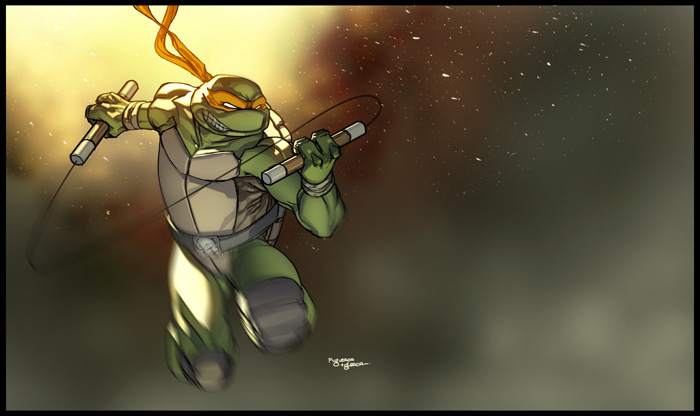
Art Jam 3: Michaelangelo

Taco pizza Dude!


Who doesn't love the TMNT? It was my favorite saturday morning cartoon and my personal childhood heroes.

In this week's Art Jam, EdsFox introduced me to a buddy of him, MarteGod. We jam at his apartment, not at Starbucks like we usually do. Turns out he is not only an awesome artist but also a really cool guy. He even gave me some beer, nothing wrong with that :) Check out his work!

Anyway, this time I drew Michaelangelo. Marte did Raph and EdsFox did Leo.

MarteGod is going to put the colors on mine. I will color EdsFox's Leo and he will color Marte's Raph.

Friday, March 4, 2011

Art Jam 2: Ryu colored

Hadoken!
This is last week's Art Jam Ryu all colored up. My friend EdsFox did the pencils, I did the coloring. It is worth mentioning that I experimented with new tecniques and I was really exited with the results. Too bad that EdsFox lost his colored version of my Ryu. ¬ ¬.

Done and colored in Photoshop.


Friday, February 25, 2011

Art Jam Numero dos: Ryu

First Ryu ever. Honest.


I went to my favorite Starbucks with my buddy EdsFox for an Art Jam. In my book this means Laptops + Tablets + coffee + good looking women = fun. This is the second time we get together to jam, and the idea is to keep doing it and inspire more people to join us.

While the first time we talked and discussed several subjects related to illustration, we pretty much did our own thing. This time we came up with a set of  rules to make it more interesting:

1. We had only 30 min. to draw
2. We would have to draw the same character. (in this case Ryu)
3. We would have to use the same software (in this case Photoshop CS5)
4. Once finished the sketch, each one had to color each other's drawing.

I tried to draw as fast as I could keeping the lines loose keeping that sketchy look, even though it was being done in Photoshop.

It was fun! Of course we extended the time up to 50 min (just cuz we wanted a little bit more detail, and we didn't finish the color part, but we will continue next week.